Case studies / Case study
Advising with AI: Reducing Friction in Academic Advising
Students don’t want AI to replace their advisors. They want it to help them show up ready.
- My role
Project Lead & UX Researcher
- Ran weekly stakeholder meetings with IT Advising and internal team syncs
- Managed the timeline and deliverables across 12 weeks
- Conducted needfinding interviews and usability testing sessions
- Timeline
- 12 weeks, February–April 2026
- Team
- 4 people
- Partner
- UC Berkeley IT Advising
- Target users
- UC Berkeley undergraduates
- Methods
- Needfinding interviews (n = 6)
- Survey (n = 27)
- Usability testing (n = 3)
- Deliverables
- Working prototype
- Cleaned research data across iterations
- Written report
The problem
Advising Is Hard to Navigate
- Goal: Explore how AI could reduce cognitive overload for undergraduates navigating academic advising.
- Constraint: IT Advising scoped the project around implementing AI in advising, so our question wasn’t whether to use AI, but where it could actually reduce friction and where students would welcome it.
- Recruiting challenge: Our early participants were almost all fellow graduate students. To reach the students we were actually designing for, we got creative and cold-emailed undergraduate UX research clubs.
The Original Experience
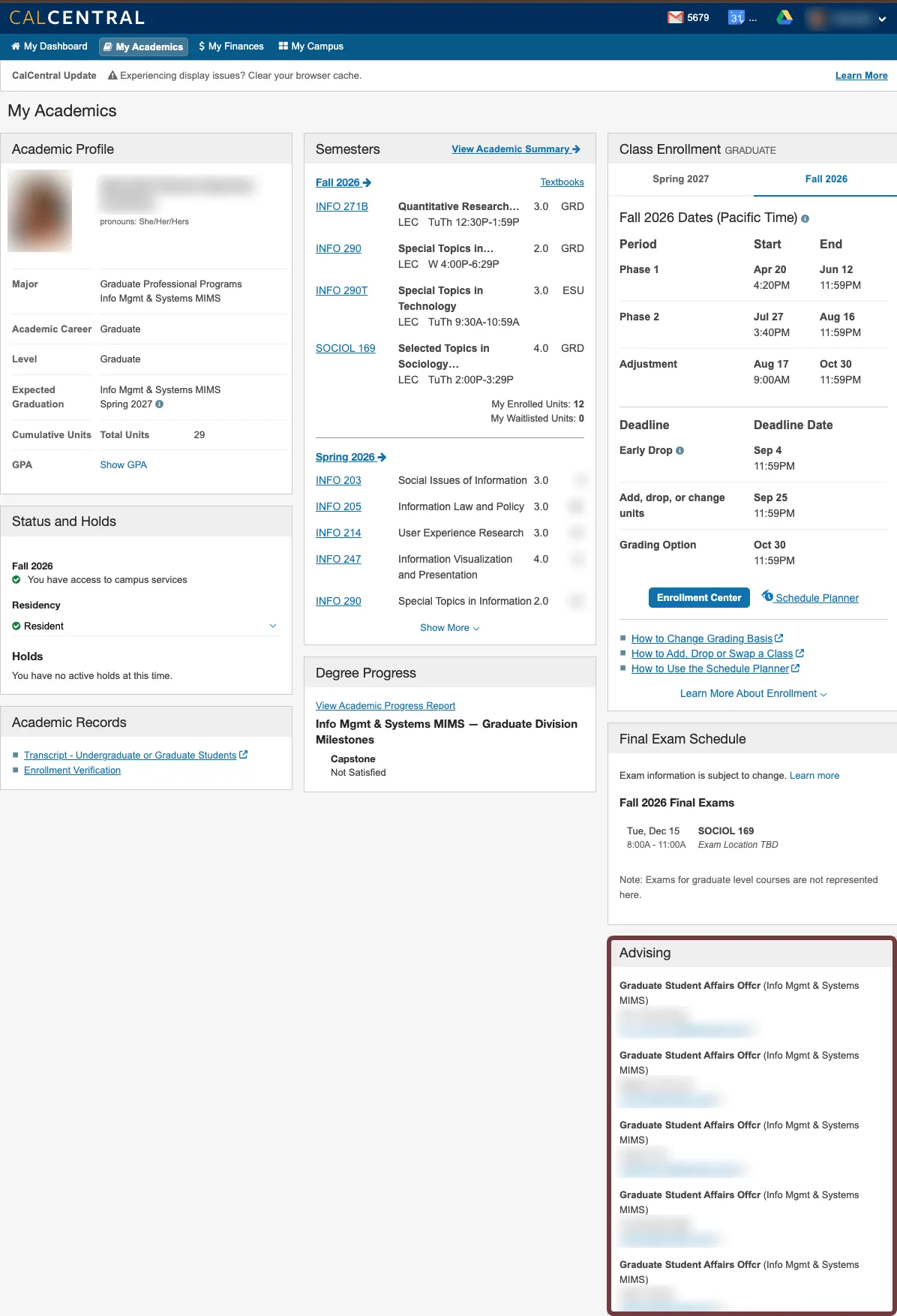
In CalCentral, the advising card sat in a corner of the page as a list of names and email addresses, with no guidance on who to contact or why.
Listening
What Students Told Us
Research Approach
-
Weeks 1–3
Needfinding Interviews
One-on-one interviews (n = 6 participants)
Explore pain points in depth
-
Weeks 4–9
Survey
Survey (n = 27)
Validate patterns at scale
-
Weeks 10–12
Usability Testing
Usability testing (n = 3 participants, 1 round)
Test the prototype and iterate
We originally planned focus groups after the interviews, but student scheduling conflicts made them impossible, so we pivoted to a survey.
Needfinding: What Interviews Revealed
- Advising is difficult to access and navigate. Appointments are usually full and hard to get.
- The system is fragmented across platforms. Students use multiple websites to reach advising and get redirected from one email to the next.
- The experience is inconsistent. One student had a great, quick interaction, but still rated the overall system just 5–6 out of 10. Quality depends on who you happen to reach.
Survey: Testing the Themes at Scale
- 27 responses (19 undergraduates, 8 graduate students), collected March 9 to April 15
- Of the undergraduates, 84% were third- or fourth-years; only 1 respondent was a second-year (our original target)
Where students go first for advising help: Department website (10), Google (5), friends (5), emailing a known advisor (4), Career Center (1), CalCentral (1).
“[I want] a clear one stop shop, everything is spread out or confusing.” (Survey participant)
When we asked what was hardest about advising, two-thirds of respondents selected “Finding who to contact.” More than half also struggled with scheduling and with knowing what to ask.
The turning point
Where Should AI Fit? The AI Spectrum
Students drew clear boundaries: they want AI for logistics, not life decisions.
-
AI can handle
Logistics and lookups
Degree requirements 89% agree
Prerequisite info 81% agree
Course planning 78% agree
-
AI assists
Human decides
Advisor routing Only 48% agree
Academic path ideas Trust 5.5/10
Career path ideas Trust 5.2/10
-
Keep it human
High-stakes decisions
Financial decisions 85% say no AI
Signing forms 81% say no AI
Major decisions 78% say no AI
81% preferred AI support combined with human advising over either alone.
The tension: Finding the right person was the #1 pain point, yet only 48% trusted AI to route them to an advisor.
What we built
The Redesign: What’s New
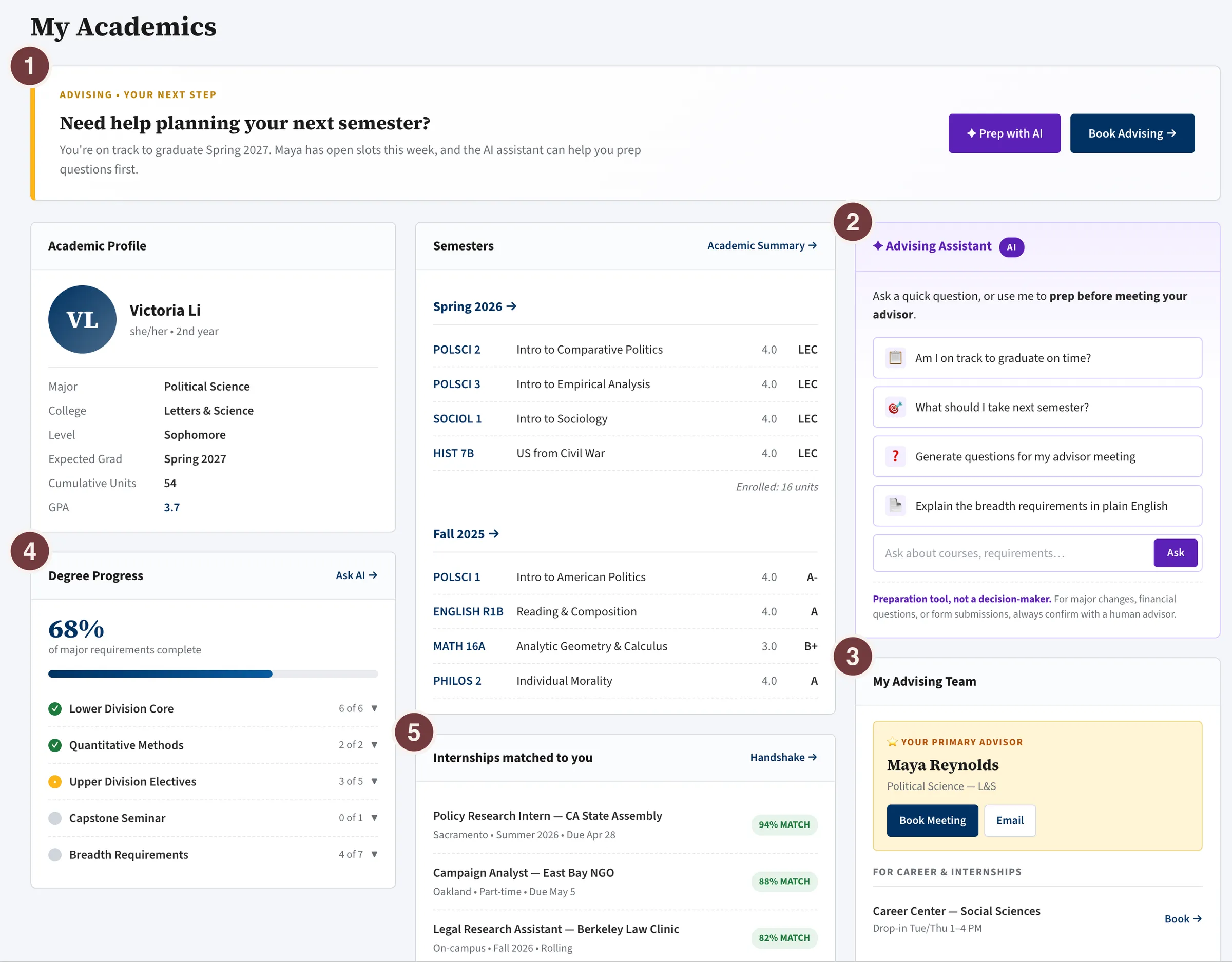
Each change traces from what we heard → what we built → what testing showed. The numbers on the screenshot match the list below.
-
Elevated advising card
- Heard: Advising was hard to find and navigate.
- Built: Moved advising to the top of the page with a clear next step.
- Tested: One participant found her advisor within 2 seconds.
-
AI as a preparation tool
- Heard: 52% didn’t know what to ask.
- Built: An assistant that checks if students are on track, answers quick questions, and generates questions for advisor meetings, clearly labeled “a preparation tool, not a decision-maker.”
- Tested: The label built trust; students felt more confident knowing a human advisor remained in charge.
-
Quick human advisor handoff
- Heard: Students kept getting redirected between emails.
- Built: Primary advisor shown with one-click booking, plus who to see for careers, study abroad, and financial aid.
- Tested: All participants found and booked their advisor quickly, with visible relief.
-
Degree progress at a glance
- Heard: 89% wanted help checking degree requirements.
- Built: Requirement progress visible immediately on the page.
-
Career opportunities
- Heard: Students wanted internship support but distrusted AI career path suggestions (5.2/10 trust).
- Built: Matched internships surfaced as resources, with decisions left to the student.
Usability Testing
Across three sessions, the core flow held up: booking worked immediately and the AI disclaimer built trust.
Remaining Gap
Multiple participants said the AI assistant would be most useful inside the Course Enrollment Center, where students are actively picking classes and where friction is highest and most actionable.
Looking back
What’s Next & What I Learned
What’s Next
- Embed in course enrollment: Only 1 of 27 students started at CalCentral, and 78% wanted help with course planning, so meet students inside the workflow they already use.
- Google Calendar integration: Scheduling was a pain point for 56%; connect booking to tools students already rely on.
- Career support, carefully: AI surfaces career resources and opportunities; decisions stay with students and advisors.
- Longitudinal study: Follow a cohort from first to fourth year to see how advising needs change over time.
Reflection: What I Learned
- Plan to pivot. Scheduling conflicts killed our focus groups, so we pivoted to a survey, which let us test interview findings across 27 respondents.
- Students drew a hard line. We expected tech-savvy students to want AI everywhere. Instead, 78–85% rejected AI for major, financial, and form decisions, and wanted humans for reassurance.
- Recruit for reality, not the ideal. We targeted second-years but got just one. Widening to upperclassmen (84% of undergrads) showed us students with years of advising experience.
We started with three pain points: students didn’t know who to contact, struggled to schedule, and didn’t know what to ask. Now their advisor is one click away, and AI helps them walk in prepared.
Students don’t want AI to replace their advisors. They want it to help them show up ready.